

Email Marketing Design Best Practices to Boost Engagement
Enhance email marketing engagement with design best practices. Boost conversions and interactions!

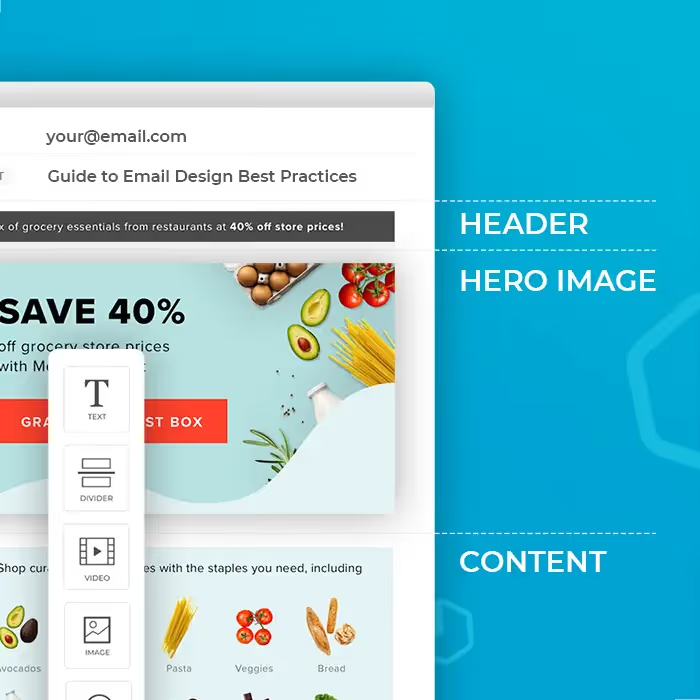
Email marketing is one of the marketing techniques with the highest potential for revenue — for every $1 you spend on email marketing, you can expect a return of $42. But that word "potential" is important: some email marketing campaigns will rake in the big bucks and others will flop. It largely depends on one thing: skillful and strategic email design.
What is email design?
Email design is the development of an email through strategic designing that ultimately engages and resonates with your business's target audience. Effective email design can be the difference between an email that wastes away unread in inboxes and one that compels readers to click and make a purchase.
Benefits of effective email design
Strong email design has the ability to significantly impact your email marketing metrics, including increasing audience engagement and excitement, building brand awareness and recognition, establishing credibility with the audience, and boosting conversion rates.
Email design best practices
Choose an email layout that suits your email's goal
The way you lay out your email will depend on what type of message you're sending. There are several common types of layouts that can each suit specific purposes and goals:
- Inverted pyramid layout: uses an upside-down triangle as its guide, grabbing attention with a broad headline, explaining more with a few lines of copy, then narrowing in on the main CTA.
- Gutenberg diagram layout: divides your email layout into a grid with four sections — primary optical (top left), strong fallow area (top right), weak fallow area (bottom left), and terminal area (bottom right), following the pattern people's eyes generally move in as they read.
- Z-pattern layout: effective because the zigzag pattern follows the path most readers' eyes will take, a great option for simple emails without much copy where you'd like to highlight the CTA.
- F-pattern layout: readers' eyes move across the page in the shape of an F, catching the top headline, bullet points on the left side, and subheadings across the page.
A couple more tips: a modular structure keeps your email mobile responsive and adaptable, and should be no more than 600 pixels wide. The rule of three — focusing on three main email design elements — can also help keep your layout simple and skimmable.
Coordinate each element of your email structure
Subject line and pre-header: the only pieces of information (other than your name) a user has when deciding whether to open the email. Make them enticing and clear.
Body: should be engaging and personal, accurately representing your company's personality while staying concise and on-brand.
CTA: the header and body should lead the reader straight to the CTA button, which should be bulletproof so it renders correctly in any inbox. Multiple CTAs can actually hurt your conversion rate, so stay focused on one primary goal, and use descriptive CTA text instead of generic phrases like "click here."
Footer: usually includes social media links and the business's physical address, or an email signature with personal contact information for solopreneurs. The footer is also required by law to include a visible unsubscribe link.
Be strategic with visual design elements
Typography: an important part of your visual branding. Use a font that's easy to read, and don't use more than two fonts to keep your emails on-brand.
Color: essential to how customers view your brand. Use a non-white background color to make your email look like one cohesive image, then choose accent colors based on your brand colors.
Animated content: GIFs and videos are popular in email design, grabbing attention with humor or demonstrating how to use your product. Since many ESPs don't allow videos to play in messages, sharing a video link is usually best.
Optimize your email design
Personalization: customers pay more attention to relevant information. Add customer names, suggest products based on purchase history, or create versions for different customer segments.
Responsive design: ensures your message changes size to be viewed on any device, since nearly half of all email opens happen on mobile.
Testing: confirm your message is mobile-responsive and take in your color choices, images, and text all together before sending.
A/B testing: run tests with two groups of subscribers receiving slightly different emails to see which variations perform best. Only change one element per test.
Accessibility: use real text instead of images, size all text to 14px or larger, add alt tags to images, and keep your contrast high so readers can distinguish elements easily. Keep image sizes small (around 600px) so your email isn't too "heavy."
Enhance inclusivity in email design
An inclusive email takes into account the many ways your audience is diverse, from gender and race to ability, culture, and age. Do your photos show people of different races, genders and abilities? Does your language reflect the reader's location and cultural differences? If you're not sure, find someone who can look over the emails and let you know.
Articles to wet your whistle



.png)
Subscribe to our newsletter.
Dive into the world of unmatched copywriting mastery, handpicked articles, and insider tips & tricks that elevate your writing game. Subscribe now for your weekly dose of inspiration and expertise.